 Use it, Learn it
End your session and review
At the end of the day, turn everything you saved into a study list.
Work as usual through the day: understand messages, write replies, star what you want to learn. When you’re done, it’s time to review.
1. Click End session
Click End session at the top right, then click it again to confirm.
Forgot? No problem. Everything is saved as you go. If you leave the app open overnight or close it, a new day starts on its own, and a Review button at the top lets you go back to the previous day.
2. Your study list
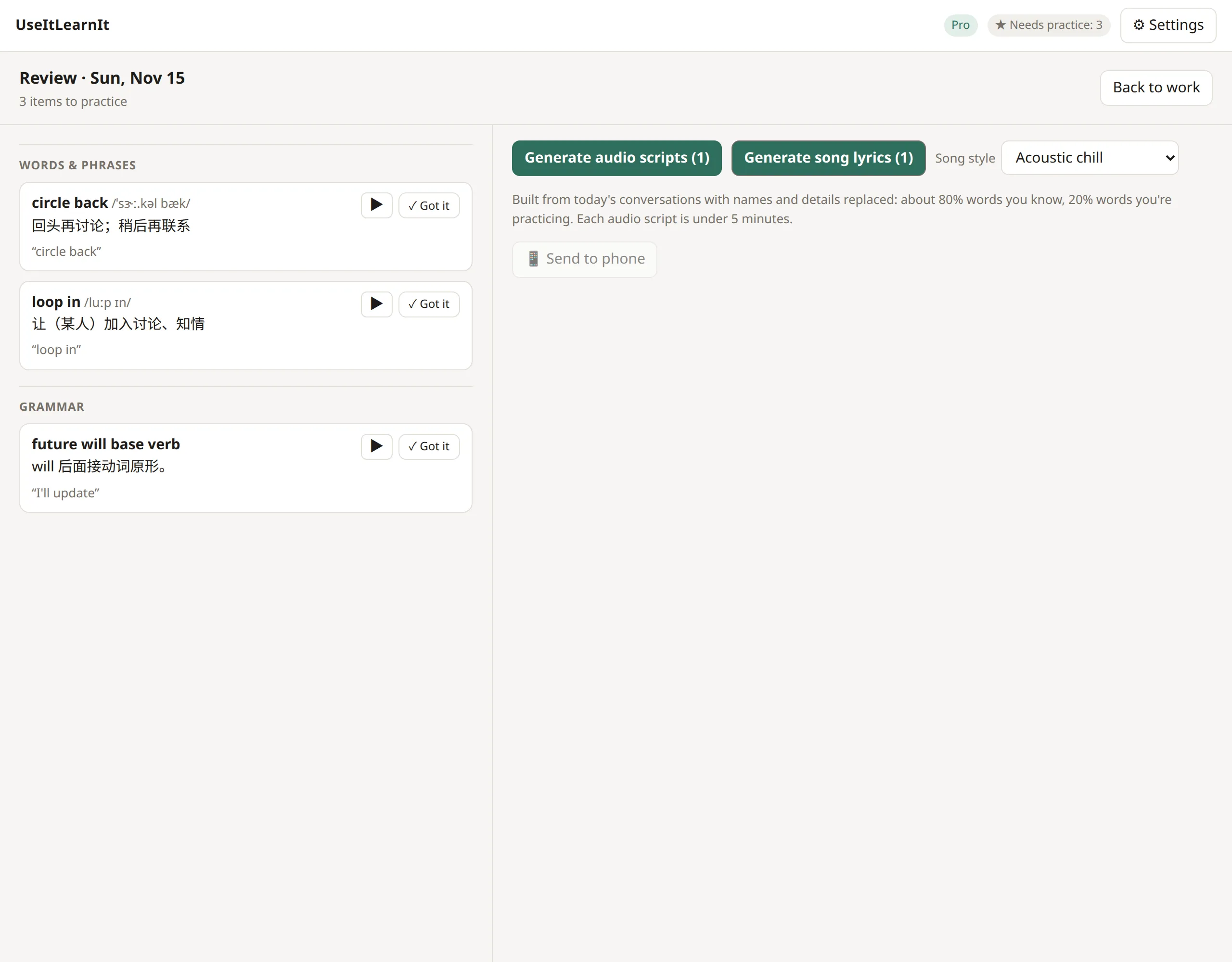
On the left is everything you starred or got wrong today, grouped into Words & phrases and Grammar. Each item shows its meaning in your language, the sentence where you met it, and a ▶ button to hear it.
- ✓ Got it: you know this now. It’s marked as mastered and won’t come back.
- With Pro, items you studied on earlier days come back here when they’re due for review (spaced repetition), under Due for review from earlier days.
3. Make it stick
On the right you can turn the list into listening material. See Make review audio and songs.
When you’re finished, click Back to work.
Free plan: the study list starts fresh with each new session. Your progress is still recorded on your computer, and Pro reveals it all, keeps your list, and brings words back when they’re due.
Still stuck? Email us and a real person will help. support@useitlearnit.com · Support