 Use it, Learn it
Listen on your phone
Send today's audio and songs to your phone with a QR code. No cables, no cloud.
Your review is made for the commute, the gym or a walk. Here’s how to get it onto your phone.
Send to phone (Pro)
-
Make your audio or song first (see Make review audio and songs).
-
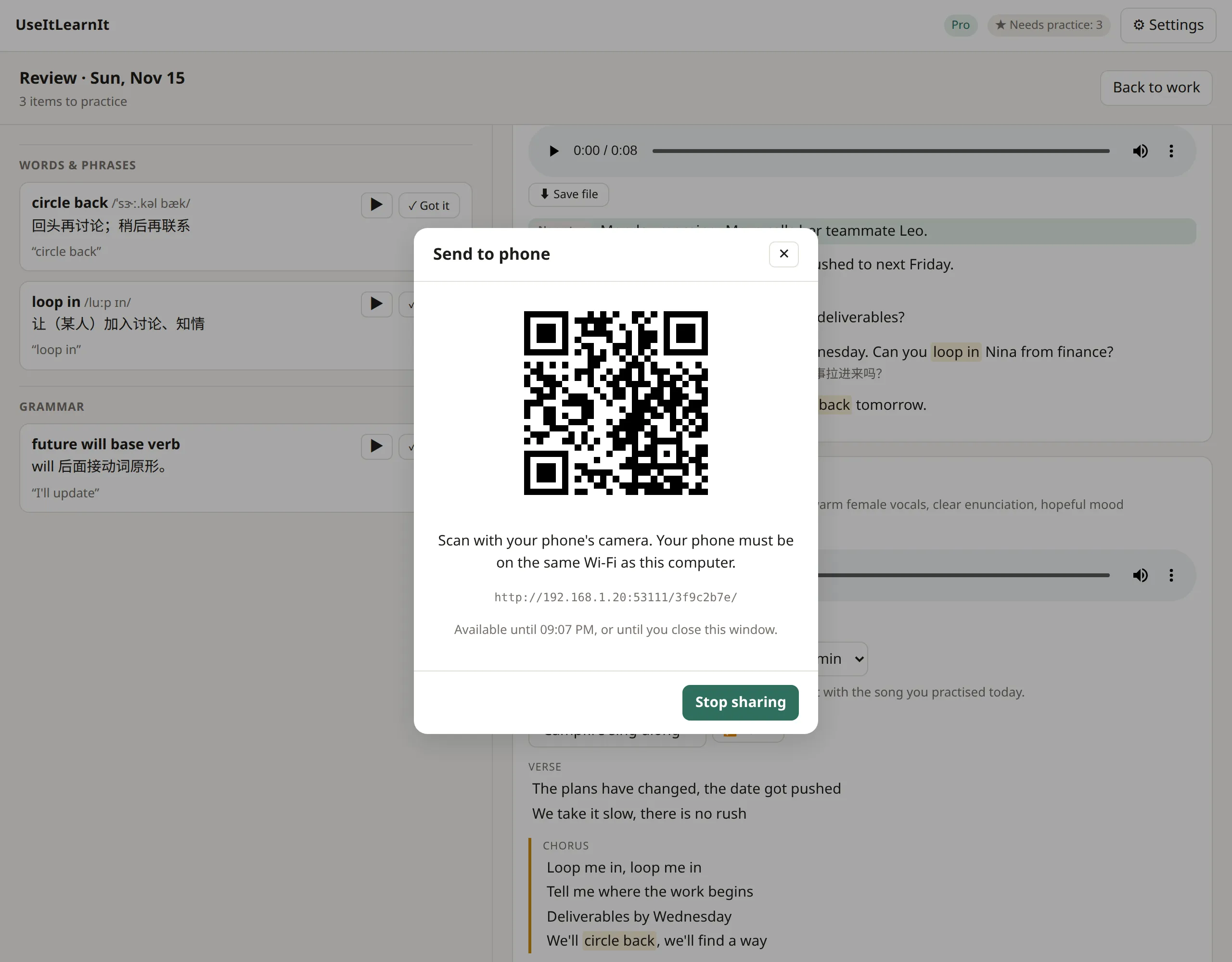
In the review screen, click 📱 Send to phone. A QR code appears.
-
Open your phone’s camera and point it at the code. Tap the link that appears.
-
A simple page opens on your phone with a player and a download link for each file. Tap download to keep a file on your phone.
Things to know:
- Your phone must be on the same Wi-Fi as your computer.
- The files go straight from your computer to your phone over your own network. They never go through the internet.
- The link works for 30 minutes, or until you click Stop sharing or close the window.
Doesn’t open? Some office, school and hotel networks stop devices from talking to each other. Try your home Wi-Fi, or turn on your phone’s hotspot and connect your computer to it.
Save a file
Every audio file and song has a ⬇ Save file button. Save the MP3 anywhere you like, for example a cloud drive folder that syncs to your phone, or send it to yourself in a chat app.
Still stuck? Email us and a real person will help. support@useitlearnit.com · Support